Blog
Supplier Collaboration Platform for DPP Data Collection
Does your supplier collaboration platform tell you who owns each product value, or does it just collect completed questionnaires? For a Digital Product Passport (DPP), shared software should let a manufacturer or brand request specific supplier fields, review the answers and approve them into a controlled product record. The starting point isn't the questionnaire, it's deciding who supplies each value, what evidence supports it and who can approve it.
Table of Contents
- What a Supplier Collaboration Platform Does for Product Data
- Assigning Each Product Field to the Right Supplier
- Keeping Identifiers and Versions Traceable
- How to Run a Supplier Data Request, Step by Step
- EU Deadlines and What They Mean for Supplier Data
- Checking a Platform Before You Commit
- Three Steps to Start Before the Deadlines
- Frequently Asked Questions About Supplier Data
- Request a DPPWare Demo for Your Product Data
What a Supplier Collaboration Platform Does for Product Data
Email passes a paper file from desk to desk. A supplier collaboration platform works more like a shared order board, where every line has an owner, a status and a defined destination.
For product data, those lines might cover materials, origin, recycled content, battery chemistry, repair information or substances of concern. The useful distinction isn't whether the information is digital. It's whether someone can trace an accepted value from its supplier to the product record that uses it.
In a January 2025 survey of 656 executives in Europe, the United States and Japan, 83% shared compliance or sustainability data with suppliers, 43% regularly used digital collaboration platforms, and 52% used email or file sharing, according to Aras's supplier collaboration survey. These are overlapping practices, not categories to add together.
Email and spreadsheets versus a supplier collaboration platform
| Control question | Email and spreadsheets | Supplier collaboration platform |
|---|---|---|
| Which supplier owns this value? | Usually unclear from the thread | Named owner for each field |
| Is the answer reviewed before use? | Relies on whoever opens the attachment | Review and approval before the record changes |
| Which product version uses it? | Hard to trace | Linked to product, batch or item and its version |
| What is still missing? | Checked by hand across files | Completeness shown per field and product |
| Who can see what? | Whole file shared with recipients | Access set per audience |
A disciplined spreadsheet process can provide some of these controls. Software becomes useful when maintaining them manually consumes the team's attention.
For material-heavy records, you can also compare materials data management platforms using Polymerize's overview, then test whether the same controls extend to supplier-originated values.
Practical test: Can you identify the supplier, approver and published version for each value without reconstructing an email conversation?
Assigning Each Product Field to the Right Supplier
Use one field, one accountable owner and one defined evidence requirement as your starting rule. Several organisations may contribute, but someone must own the answer and resolve discrepancies.
Read the ownership table by selecting the relevant field, checking who holds the information and naming an internal approver. These are suggested operational assignments, not a universal list of legally required fields or evidence.
Typical field owners and evidence by product group
| Field | Usual supplier owner | Evidence to request | Internal approver |
|---|---|---|---|
| Fibre composition, textiles | Yarn or fabric mill | Supplier declaration and test report | Product compliance lead |
| Cell chemistry, batteries | Cell manufacturer | Cell datasheet and test report | Battery compliance manager |
| Recycled content, any product | Material supplier | Certificate or test report | Sustainability manager |
| Substances of concern, electronics | Component supplier | Declaration and laboratory report | Quality or compliance owner |
| Dimensions and materials, furniture | Panel or component supplier | Specification sheet | Product data manager |
| Packaging material, any product | Packaging supplier | Material specification | Sustainability manager |
| Repair information | Spare parts supplier or manufacturer | Repair documentation | Service or technical documentation lead |
Separate the contributor from the responsible operator
For batteries, the company placing the finished battery on the EU market carries the passport obligation, while cell and module suppliers contribute underlying information, as explained in the European Commission's battery passport guidance. Separate model-level attributes from individual-battery information rather than asking a cell supplier to complete the entire finished-battery record.
A declaration records what the supplier states. A test or verification report provides evidence within its stated scope; check the product, method and coverage before accepting it.
Product matching needs equal care. Doczen's guide to product code matching offers useful context for reconciling manufacturer codes before assigning answers to records.
Build the map before configuring product data management. Mark non-applicable fields explicitly, and take borderline responsibility questions to your legal or compliance adviser for a binding assessment.
Keeping Identifiers and Versions Traceable
A supplier's internal article number is like a library shelf label: useful locally, but not necessarily meaningful to a repairer or another organisation. A shared identifier gives participants a more dependable way to identify the same product.
GS1 Digital Link supports identifiers including GTINs, GLNs, batch numbers and serial numbers in web addresses, allowing a barcode to connect an identified item to multiple information resources, including traceability and product data.
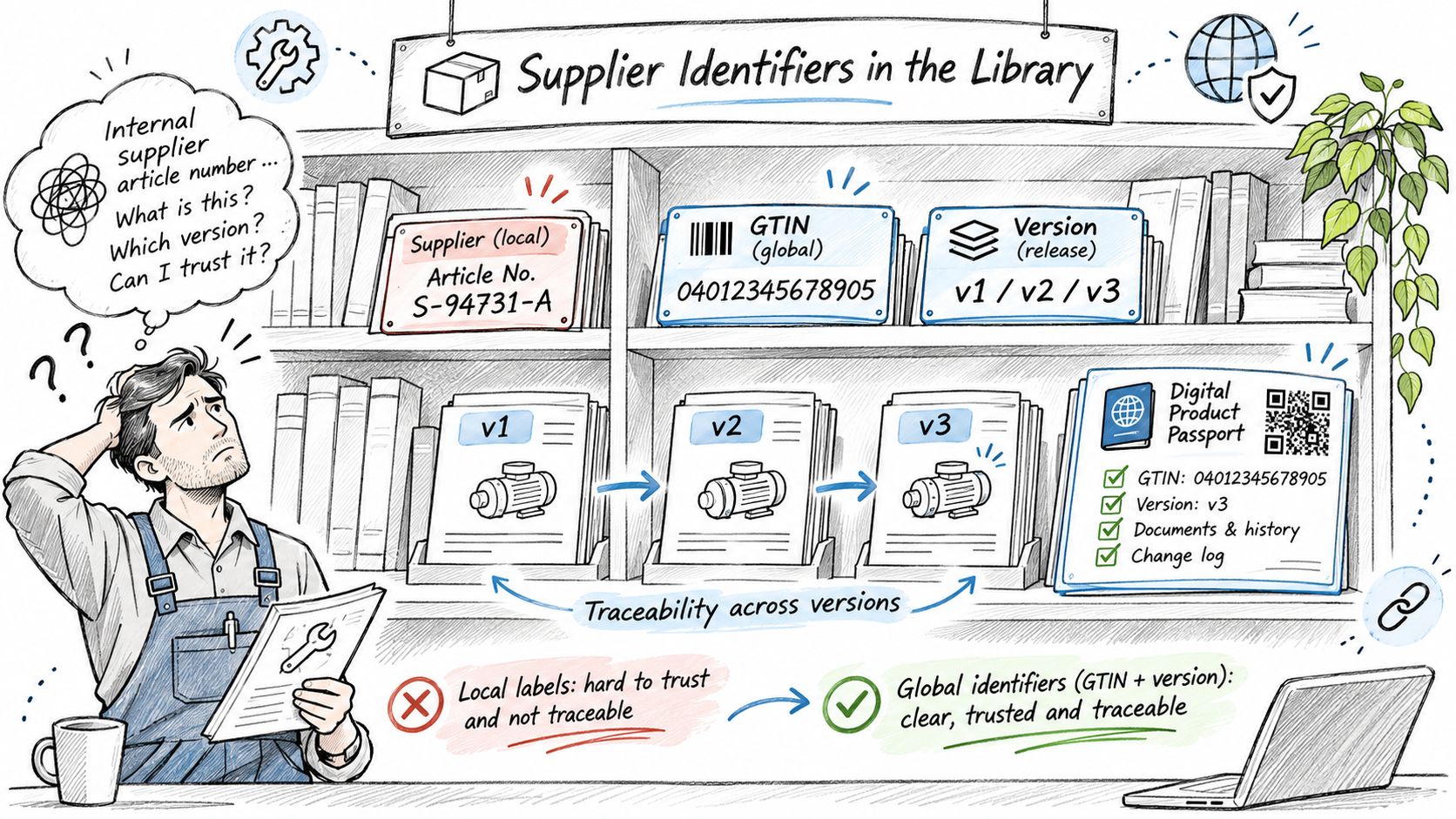
Define a canonical identity model before onboarding suppliers. Use a product model or GTIN at commercial level, a batch or serial identifier where appropriate, and separate identifiers for organisations, facilities and materials. A GLN can identify a facility; a supplier name alone shouldn't serve as the association key.
The data carrier, such as a QR code, connects the physical product to its passport. Don't confuse that connection with the underlying identity model: printing a code won't resolve ambiguous product mappings.
Preserve the release, not just the latest answer
When a supplier corrects a value, retain the earlier published release and its supporting history. Record the submitter, timestamp, reviewer, approval decision and effective date, so the correction doesn't rewrite an earlier declaration.
Keep workflow states distinct: requested, submitted, internally reviewed and approved for publication. A submitted correction isn't automatically an approved replacement.
Before expanding onboarding:
- Reject duplicate keys. Investigate conflicting mappings rather than merging records automatically.
- Record effective dates. Establish which production or product context the value covers.
- Test physical scans. Check manufacturing, logistics, repair and recycling use cases, not just the office demonstration.
How to Run a Supplier Data Request, Step by Step
Run requests as a controlled queue, not an attachment campaign. Name the person responsible for reviewing returns before sending anything.
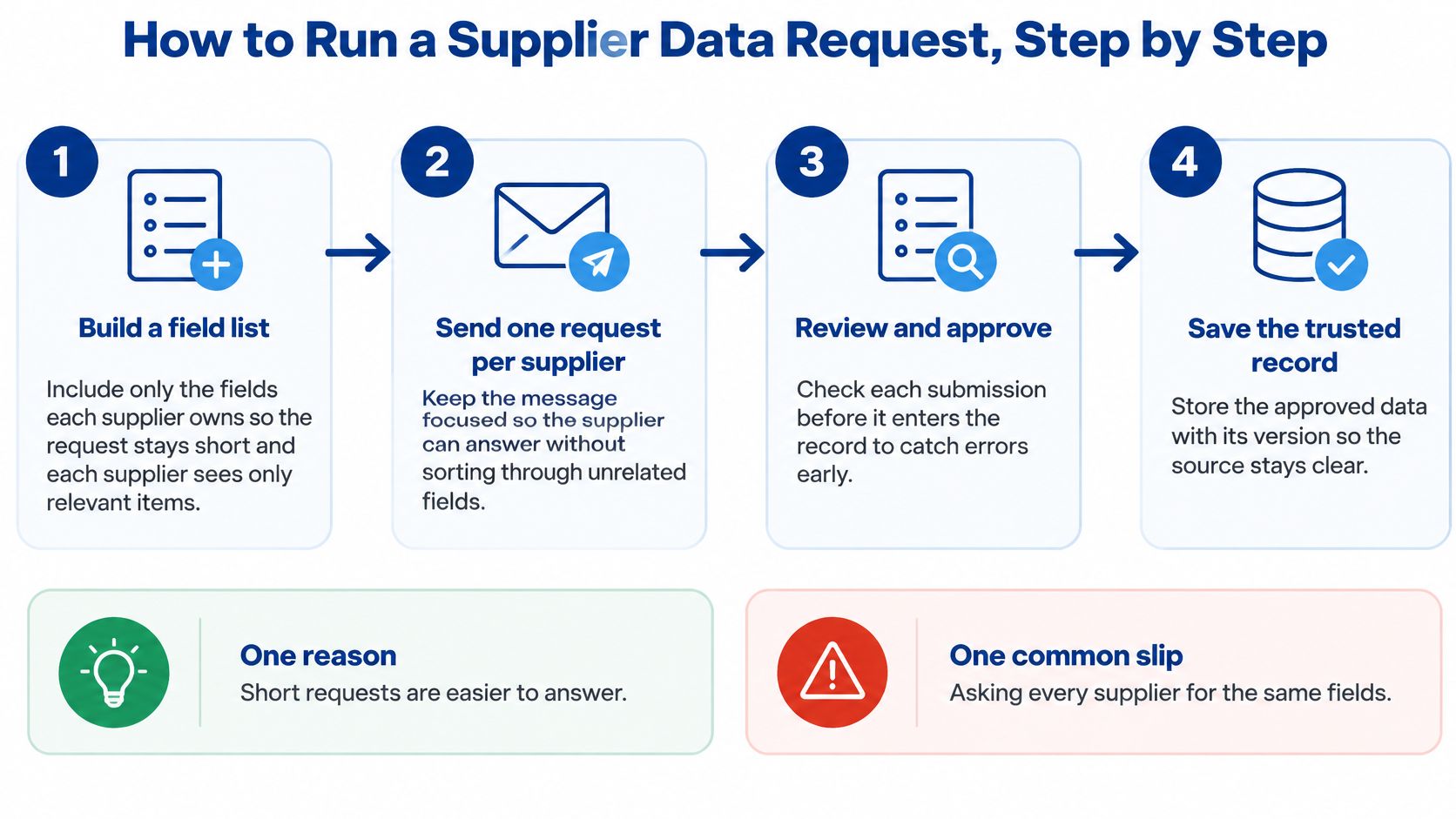
Build a supplier-specific field list. Include only the information that supplier owns, with definitions and accepted units, so the request stays answerable. The common slip is sending the whole product template to everyone.
Create the request and share its link. Direct entry keeps answers associated with the requested fields. Don't accept an email reply without assigning someone to map it back into the workflow.
Set a due date and a review owner. Track who owes which information and when, leaving time for clarification before your release decision. A request without a deadline is difficult to escalate fairly.
Review the submission against field rules. Check units, evidence type and the correct model, batch or item before accepting the value. A convincing report for a different batch doesn't settle the request.
Route exceptions to a named internal owner. Missing, contradictory and non-applicable answers need a recorded reason and decision. Don't settle a conflict by email and leave the product record unexplained.
Approve accepted values into the record. Keep evidence references associated with the fields they support, using your controlled evidence repository where necessary. A folder of attachments without field mappings doesn't establish which answer the reviewer accepted.
Check completeness and release a new version. Run required-field checks, retain earlier releases and record the publication action in the activity log. Overwriting the live record removes the context needed to explain earlier decisions.
Done means an approved, traceable record with completeness visible by field and product, not a folder full of supplier replies.
Give reviewers an explicit route to return a submission for correction. Otherwise, deadline pressure can turn an unresolved question into an accepted value because nobody owns the next action.
EU Deadlines and What They Mean for Supplier Data
From 18 February 2027, electric-vehicle batteries, light means of transport batteries and industrial batteries with a capacity greater than 2 kWh placed on the market or put into service must have an electronic battery passport under Article 77 of the EU Battery Regulation (EU 2023/1542).
The Ecodesign for Sustainable Products Regulation (EU 2024/1781), or ESPR, works differently: passport availability is a condition for placing a product on the market or putting it into service under the applicable delegated act and DPP rules, and passport data must be accurate, complete and up to date. Product-specific scope and detailed requirements come through delegated acts, not a single universal deadline.
Dates fixed in law and what depends on delegated acts
| Rule | Scope | Status |
|---|---|---|
| EU Battery Regulation | EV batteries, light means of transport batteries and industrial batteries over the threshold stated above | Fixed in law |
| EU Battery Regulation | Batteries outside that scope | Check the regulation text and get advice |
| ESPR | Textiles | Requirements depend on a delegated act still to come |
| ESPR | Steel | Requirements depend on a delegated act still to come |
| ESPR | Electronics, furniture and other product groups | Requirements depend on delegated acts still to come |
Turn legal scope into a controlled field list
Map your product groups and monitor the delegated acts relevant to them. Don't assign an assumed passport date to textiles, steel or electronics, or treat a draft dataset as a final mandatory template.
Separate preparation from obligation. You can organise identifiers and ownership now without demanding every potentially relevant sustainability value from every supplier.
When assessing digital product passports, distinguish data-management controls from the legal assessment. No supplier collaboration platform establishes compliance on its own.
Borderline products, responsibility allocation and technical implementation need a binding answer from your legal or compliance adviser. Software should support that decision, not make it implicitly through a default form.
Checking a Platform Before You Commit
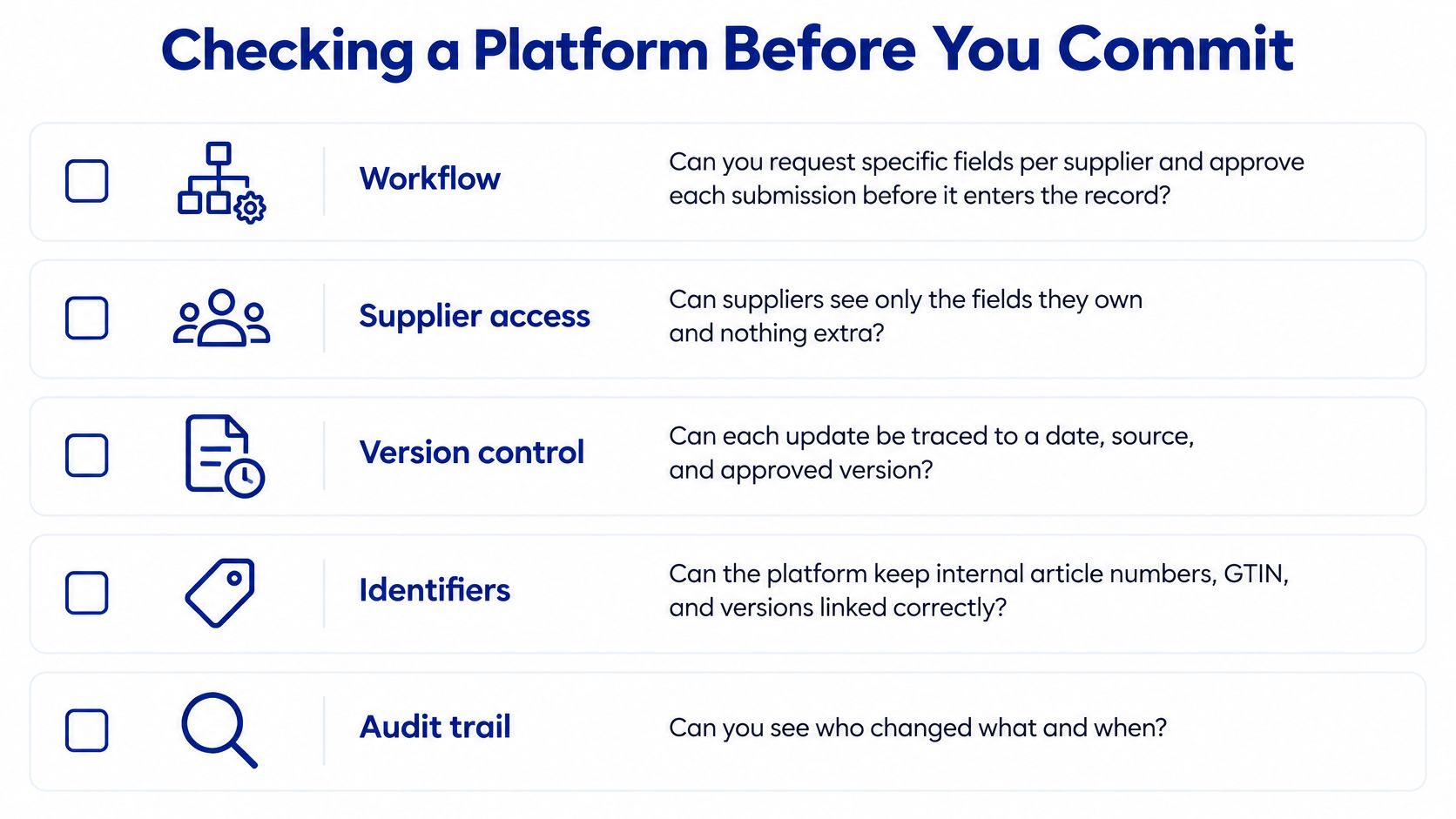
Ask vendors to demonstrate a difficult supplier submission, not just a finished passport page. Use a deliberately incomplete answer, an identifier mismatch and a correction after publication to see how reviewers handle exceptions.
The strongest demonstration follows your own product through the workflow. A polished sample record won't show whether your team can manage missing evidence or restrict a supplier's view.
Vendor questions and what a good answer looks like
| Criterion | Question to ask the vendor | Good answer |
|---|---|---|
| Workflow | Can you request specific fields per supplier and approve each submission before it enters the record? | Yes, per field, with a review step |
| Supplier access | Can suppliers answer through a link without full system access? | Yes, and they see only assigned fields |
| Audiences | Can access be set per field for the public, legitimate-interest parties and authorities? | Yes, field-level for each audience |
| Publishing | Does the tool check required fields, keep versions and link each passport to a QR code? | Yes, checked before each release |
| Reporting | Do readiness reports, an activity log and CSV export cover the whole catalogue? | Yes, across all products |
| Integrations | Which ERP, PIM or shop connections are live, project-configured or planned? | A clear release status for each connection |
Test the work behind each answer
For workflow, ask the vendor to return an answer for correction without publishing it. For access, open the supplier link and inspect exactly what the supplier can see, including whether unrelated commercial information is exposed.
For publishing, ask which checks block release and who controls the required-field configuration. A completeness indicator is only useful if its rules match the product's applicable requirements.
For reporting and exports, inspect an incomplete catalogue rather than an immaculate demonstration record. The report should help a manager allocate follow-up work, while the export should preserve enough context to interpret the values outside the application.
Use ISO Security's guidance on assessing supplier information security risks alongside the functional evaluation. Access restrictions and supplier onboarding deserve the same attention as the public passport page.
Separate available functions from promises
As a concrete example, DPPWare offers structured model, batch and item records, supplier requests by link with review and approval, field-level audience access, required-field checks, versioned publishing and QR-code passport pages. Our reporting includes readiness reports, an activity log and CSV export; textiles work out of the box, while other industries are configured per customer project.
Don't assume those capabilities imply automated connections to your existing systems. Ask each vendor to demonstrate the actual data handover and explain who operates it.
Buying rule: Evaluate the workflow you can use today separately from the roadmap you might use later.
Refuse guarantees of legal compliance and feature lists without release status. A precise limitation is more useful than an integration promise with no working demonstration.
Three Steps to Start Before the Deadlines
Start with a bounded pilot that your compliance, procurement and product-data teams can review together. You don't need to choose software before deciding who owns the information.
Classify your EU product range. List the product groups you sell and distinguish the fixed battery scope from groups awaiting delegated acts. Assign someone to monitor relevant legal developments, and record unresolved scope questions for your legal or compliance adviser rather than guessing.
Map your highest-risk product's fields. Choose a product with significant supplier dependencies or uncertain evidence, then name the supplier owner, accepted evidence and internal approver for each relevant value. Build this in a spreadsheet if that's the quickest way to get agreement across functions.
Run a complete request before expanding. Select a supplier that owns important fields, send a focused request and take the response through review, correction, approval and readiness checking. Evaluate whether another reviewer could understand the final decision without asking the person who handled it.
Fix the process before increasing volume
Use the pilot to look for mismatched product codes, unclear evidence coverage and fields that nobody believes they own. These are reasons to refine the request, not reasons to distribute the same unresolved template more widely.
- Resolve identity gaps first. A complete answer against the wrong product creates rework.
- Clarify evidence expectations. Tell suppliers what the reviewer will accept before they respond.
- Keep scope decisions accountable. Legal interpretation stays with the legal or compliance adviser, even when the operational map is maintained by procurement.
Frequently Asked Questions About Supplier Data
Is a spreadsheet enough for a small supplier base?
Yes, if you can maintain ownership, approval and release history reliably. Use protected fields, a controlled master copy and a separate decision log. A platform becomes worth considering when people spend more time reconciling copies and permissions than reviewing the actual information.
How many suppliers should we contact first?
Start with suppliers responsible for the highest-risk fields, not the largest contact list. Prioritise information that could block a release decision or needs difficult verification. Expand once your reviewers agree on definitions, evidence standards and the way exceptions are resolved.
What if a supplier changes a value after publication?
Treat the change as a new submission requiring review. Establish which products and production periods it affects, assess whether a revised release is necessary and retain the earlier version. Don't let a supplier correction overwrite published information without an accountable decision.
Does using a platform make our products compliant?
No, it supports information management rather than establishing compliance. Your team still needs the relevant legal and technical assessment, including applicable testing or certification. Take binding questions about product scope, responsibility and conformity to your legal or compliance adviser.
Does a QR code determine who can see sensitive data?
No, the code provides the route to the passport, while access rules determine visibility. Test public access separately from restricted access for legitimate-interest parties and authorities. A working scan doesn't prove that confidential fields are properly restricted.
Request a DPPWare Demo for Your Product Data
A useful demo starts with your products and suppliers, not a generic catalogue. Bring a product list, a supplier list and an unresolved field so the conversation can focus on ownership, evidence and approval.
DPPWare is B2B software for DPPs, built and hosted in Germany, with a data centre in Nuremberg. Every engagement starts with a conversation about the customer's products and suppliers.
Put an actual request through review
The demo can cover structured records, requests for specific supplier fields by link, review and approval, field-level access, versioned publishing and QR-code passport pages. Users can see which supplier owes which data, by when, and what is waiting for review.
- Available workflow. Suppliers answer requested fields without an account; today, users copy and share the request link themselves.
- Industry setup. Textiles work out of the box. Other industries are set up per customer project.
- Planned functions. ERP and PIM integrations, an API and CSV import are planned rather than available.
Ask which functions are live for your intended process and which require project configuration. The platform doesn't guarantee legal compliance or replace certification or testing; binding assessments remain with your legal or compliance adviser.
DPPWare offers field-specific supplier requests, review and approval, and versioned product records for managing DPP information. Visit DPPWare to request a demo, and bring your product and supplier lists so you can test the workflow against the information you need.
This article explains regulations in general terms and is not legal advice. For a binding assessment of your products, check with your legal or compliance advisor.