Create and manage Digital Product Passports
An editor for the data, a rule for publishing and a version for every release.
Creating a passport is less about design than about decisions: which value is correct, who is allowed to see it and whether the record is complete enough to publish. The passport editor is built around these three decisions.
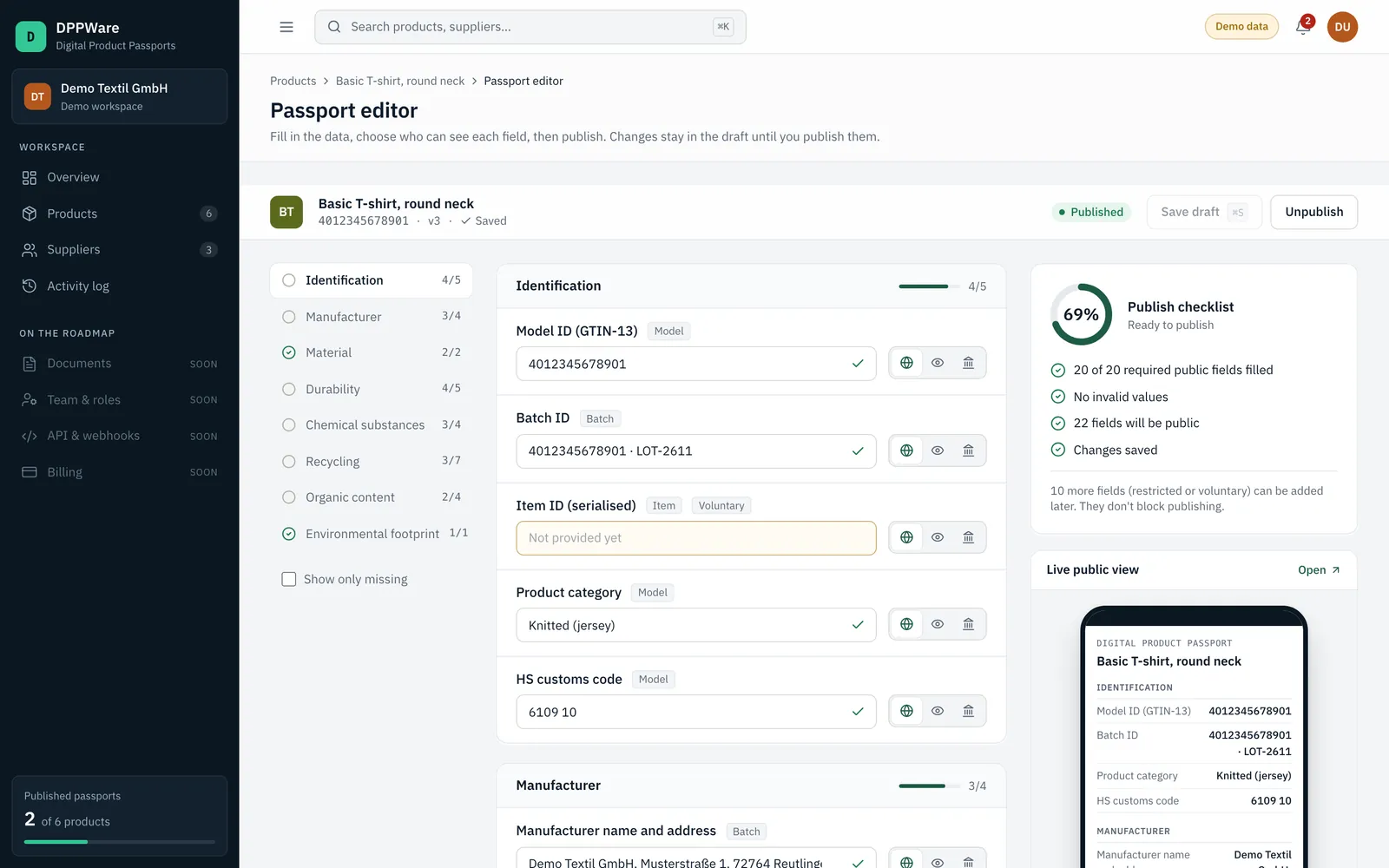
Fields are grouped into sections. For each field you enter a value and choose an audience. A preview next to the editor shows the public passport as a reader will see it, so the effect of each decision is visible at once.
Functions
What you can do today
- Edit field by field
- Every field shows its label, its level (model, batch or item) and whether it is required or voluntary.
- Set an audience per field
- Choose between public, parties with a legitimate interest and authorities. The public page shows only public fields that are filled.
- Work in a draft
- Changes are saved to a draft. The public passport stays as it is until you publish the changes.
- Publish against a rule
- Publishing is possible only when every required public field has a value. The server enforces the rule.
- Keep versions
- Each publication of changed content receives a new version number and is written to the activity log with a timestamp.
- Withdraw a passport
- A published passport can be unpublished. Its public page is then no longer reachable.
Process
How it works
Open the editor
Start from the product page. Missing required fields are marked.
Enter values and audiences
Work through the sections and check the result in the preview.
Publish
When the required fields are complete, publish. The passport receives a version and a public page.
Limits
Limits today
- The field set is a prototype for textiles after a draft study, not a legal template. Field sets for other product groups are configured in a project.
- Document fields hold a reference or certificate number. File upload is planned.
- Verified access for legitimate-interest parties and authorities is planned. Their fields are already separated in the data.
- Versions are recorded by number and date. Restoring the content of an earlier version is not possible yet.
Available: works in the application today. Configured per project: set up together with you. Planned: on the roadmap, not delivered yet.
Related
All platform functions
- Product data managementOne record per product with identifiers, materials, suppliers and completeness per section.
- Supplier collaborationRequest fields from a supplier by link, review what comes back and approve it.
- QR code and passport publishingA public page and a QR code for every published passport.
- Readiness reporting and exportsReadiness across the catalogue, an activity log and CSV export.
Ready to manage your product data more effectively?
Tell us about your organisation, product portfolio and DPP requirements.
Model, batch and item level
Three audiences per field
Versioned publication
Hosted in Germany